
How to Fix SEO
How to Fix Your SEO, in the Order That Matters
Most "fix my SEO" advice is a 40-item checklist. You do not need 40 fixes. You need to know which 2 or 3 are holding your pages back, do those, and prove they went live. This page walks the loop, with the free audit as step one and no account needed.
Step 1
Find out what is actually broken
Guessing is the expensive part. A page that does not rank usually has one dominant problem, not twenty small ones, and the dominant one is rarely the one you noticed.
Paste the URL into the free audit. In about a minute you get every finding ranked by impact against effort, from "fix today" to "ignore". It checks the things that decide whether Google can crawl, understand and trust the page: status codes and redirects, indexability, title and heading structure, internal links, page speed, structured data, and whether the page front-loads a direct answer. It checks one page per run, so start with the page that matters most.
Read the top three. Stop there for now. Every finding is ranked by impact vs. effort, in plain language. See the full scoring methodology.
Step 2
Fix crawl and index problems first
If Google cannot reach the page, or is told not to index it, nothing else you do counts. Check these before touching a single word of copy:
- The page returns 200, not a 3xx chain or a soft 404.
- No noindex tag or header, and robots.txt does not block the path.
- The canonical points at this page, not a variant with a trailing slash or a parameter.
- The page is in your sitemap and linked from at least one other indexed page.
- Mobile rendering shows the same content as desktop.
In Search Console, the Pages report tells you which of these Google has hit. "Crawled, currently not indexed" and "Discovered, currently not indexed" are the two statuses worth acting on.
Step 3
Match the page to the search
The most common reason a healthy page sits on page 2 or 3 is that it answers a different question than the one people typed. Search your target phrase in a private window and look at what ranks. If the top results are guides and yours is a product page, or they are comparisons and yours is a definition, you have an intent mismatch. No amount of technical polish fixes that.
Rewrite the page to match what ranks: same type of page, your own depth and data. Put the direct answer in the first 100 words. Use the headings people actually search, and answer the "People also ask" questions on the page itself.
Step 4
Fix the on-page basics, once
These take an afternoon and you only do them once per page:
- One H1 that contains the phrase the page targets.
- A title tag of roughly 50–60 characters (about 580px, where Google cuts it off) that says what the page is and why to click.
- A meta description that makes a promise the page keeps.
- Descriptive internal links from your highest-authority pages to this one, using the words you want to rank for.
- Images in WebP with real alt text, and no element shifting the layout after load.
Step 5
Verify every fix went live
This is the step everyone skips. You change a title in the CMS, it looks right in the editor, and the live page still serves the old one because of a cache, a plugin, or a template override. Weeks pass before anyone notices.
After each change, re-check the same URL and the same signal. Cheapest way: view the live page source, or run the URL through Search Console's URL inspection. Or run the free check again and compare the two scores. A paid analysis includes one verification re-scan that re-tests the findings you fixed, on the page you fixed, and reports each one as verified or not applied. It is one re-scan per analysis, not a button you press after every edit, so batch your fixes for that page first.
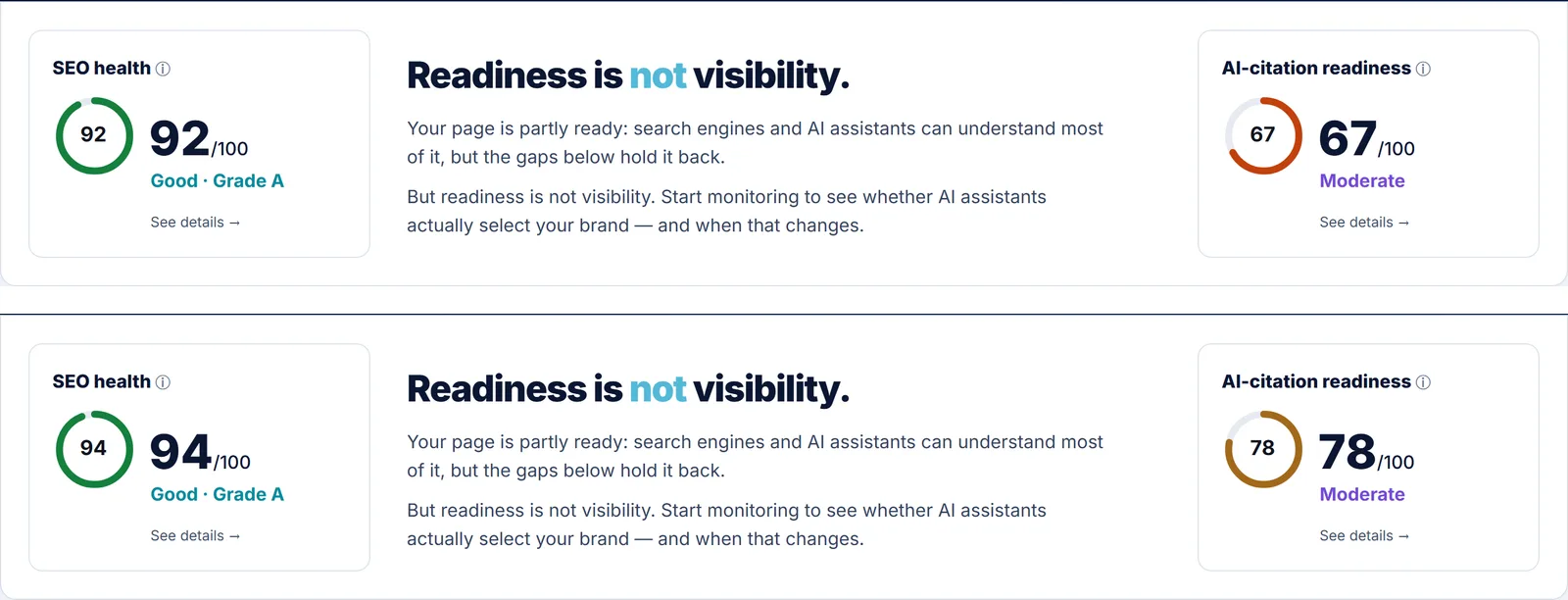
Our own homepage, free-checked on 1 and 10 August 2026 after acting on the findings: SEO health 92 to 94, AI-citation readiness 67 to 78. Not our current state. Scores move both ways, which is the point of re-checking.
Step 6
Wait, measure, repeat
Google needs time to re-crawl and re-evaluate. Give a fix 2 to 4 weeks before judging it. Watch three numbers in Search Console for the page: impressions, average position, and clicks, in that order. Impressions usually move first, position second, clicks last.
Then run the audit again and take the next finding from the top. Each verified fix compounds. Five fixes made at once with no verification leave you unable to tell which one helped and which one hurt.
What fixing SEO does not do
It does not guarantee a ranking. No tool and no agency can. It does not force Google to re-crawl on your schedule. And fixing a page that nobody searches for produces a perfect page with no traffic, so check demand before you polish.
FAQ
How to fix your SEO: FAQ
What's the first step to actually fix my SEO? +
Run a free audit, fix the single highest-impact finding first, then verify it actually went live before moving to the next one — that is the real fix loop, not a 40-item checklist tackled top to bottom. A free audit at KinetixSEO ranks every finding by impact versus effort, so the first result on the list is the change most likely to move rankings for the least work, not just the first thing a crawler happened to flag. Fix that one finding, run the built-in verification re-scan to confirm the change is live and correctly implemented, then move to the next-ranked item. Repeating this loop — fix one, verify, move on — beats trying to fix a long list all at once, because each verified fix compounds instead of leaving you guessing which of several simultaneous changes actually helped.
Do I need to fix everything the audit finds? +
No — fix findings in the order the impact-vs-effort ranking gives you, not in the order they appear on the page. Not every finding carries the same weight: a missing meta description on a low-traffic page matters far less than a broken canonical tag on your highest-traffic page, even though both can show up as single line items. Working through the ranked list from the top down means the finding most likely to move your SEO Health Score or GEO Readiness Score gets fixed first, and you can stop at any point once the remaining findings are lower-impact than the time they would take. There is no requirement to clear the whole list — clearing the top three or four ranked items usually delivers most of the available improvement for one page.
How do I know if a fix actually worked? +
Run the verification re-scan built into the product — it re-checks the specific page after you make a change and confirms whether the fix is actually live, rather than asking you to take your own word for it. Many fixes fail silently: a meta description gets saved in a CMS field but never renders in the actual HTML, a redirect gets configured but points to the wrong URL, or a canonical tag gets added to the wrong template and only shows on some pages. A visual check of the live page cannot always catch these, because the problem is often in the underlying markup, not what a human sees in a browser. The re-scan checks the same underlying signal the original audit checked, on the same page, so a passed re-scan means the automated check that found the problem now confirms it is gone.
Can I fix my SEO myself, without an agency? +
For most small sites, yes. Finding the problem, crawl and index checks, matching the page to the search, on-page basics and verifying the fix need a CMS login and an afternoon, not an agency. The free check finds and ranks the issues in plain language, and a paid analysis turns each one into a ready-to-paste fix, actual copy and code, not just a description of the problem. Where you will want help: a site-wide redirect migration, a JavaScript rendering problem that hides content from crawlers, a server configuration issue, and building links. For those, the audit still states exactly what is broken and why, which shortens the conversation with whoever does the technical work.
How long does it take to fix SEO? +
The fix itself takes hours. Seeing it count takes longer, because Google has to recrawl the page first. Google's own figures put a typical recrawl of an existing page at around 30 days, sooner for pages it visits often, and you can speed it up by requesting indexing in Search Console. After the recrawl, a title or snippet change typically shows within 1 to 2 days. A robots.txt fix takes up to a day to be read, because Google caches the file. Content and intent fixes usually take 1 to 3 months to settle, and recovering from a core update typically takes 3 to 6 months. Authority problems, where competitors simply have more links, take the longest and cannot be fixed on the page alone. Confirm the fix is live right away with a re-check; treat ranking movement as a separate, slower signal.
Does fixing SEO also help with AI search visibility? +
Yes — many of the same fixes that improve classic search rankings also improve whether AI systems like ChatGPT and Gemini can find and cite the page, because both draw on shared signals: clear structure, direct answers, and crawler access. The free check returns an SEO Health Score and a GEO Readiness Score from the same scan, so a fix ranked highly for one often moves the other too. Fixing a heading hierarchy improves structural readability for both traditional search and AI extraction, and making sure AI crawlers like GPTBot are not blocked in robots.txt is a GEO-specific fix with no classic-SEO downside.
Start with step one
Free, no signup. Paste a URL, get the findings ranked, fix the top one.